
In recent years, AI has seen an unprecedented advance in innovation and progress. MCP or Model Context Protocol, is one such innovation that immensely helps in building more context aware models.
Traditional AI models always had to rely on a fixed set of rules that were learnt based on data current at the time of model creation. They do not have any knowledge about the environment they are working in, nor do they have access to current affairs. So, all such models struggle when they have to deal with adaptability and context-awareness.
Model Context Protocol (MCP) refers to a novel approach in designing artificial intelligence systems that can effectively navigate complex and dynamic environments. The core idea behind MCP is to create agents that are not only intelligent but also aware of their own context and limitations. This awareness enables the agent to adapt and learn from its surroundings, leading to improved performance and decision-making capabilities. It was initially introduced by Anthropic and has since then been adopted by all other models.
Why do we need context aware models?
As AI systems become increasingly ubiquitous in our lives, it becomes essential to develop models that can navigate complex contexts with ease. In today’s fast-paced world, where information is constantly changing and uncertain, context-awareness is no longer a luxury but a necessity. MCP addresses this need by introducing a new paradigm for designing intelligent systems that can adapt to dynamic environments.
MCP has several advantages.
- Awareness to context: An agent can understand its own context including its limitations. For example, if I want to get data about a specific company user, the agent understands that user data is private to the company and does not contain in the set model had been trained on.
- Adaptability: An agent will be able to adjust its behavior based on changing situations.
All of these features eventually gives the model increased robustness and also since it now has access to context, make better decisions.
The MCP Server
For this blog we will start by building a MCP server that can run a web query. We will use dux library to fetch information. Later we will create a simple AI agent that can use this MCP server and fetch current data. Of course OpenAI already provides a mechanism to fetch web info using serperapi, but for this project we will build our own.
Python provides an easy way for building MCP severs using FastMCP library. If you use uv to manage projects, you can just add fastmcp using uv add fastmcp command. Let’s start with the imports.
import logging
from fastmcp import FastMCP
from fastmcp.tools import tool
from fastmcp.resources import resource
from fastmcp.prompts import prompt
from fastmcp.server.middleware import MiddlewareContext
from fastmcp.server.middleware.logging import LoggingMiddleware
Next we will start implementing the MCP. Before we go there, let’s understand the underlying search library. We will use ddgs (Dux Distributed Global Search) which uses DuckDuckGo as the underlying search. Now ddgs itself comes packaged with a MCP server, so creating a MCP server on top of it is redundant. However, we will still create one for reference purposes.
I am a big proponent of DuckDuckGo browser. As we started moving away from Netscape to the wonderful world of Chrome, where browsing was faster, we also started losing web privacy. If you searched for spaceships for your science project, there is a high possibility that Elon may try to sell you a spacecraft customized just for you in the next hour. Anyway, jokes apart, DuckDuckGo came with the assurance that privacy is a right and not optional. All search is anonymous, so the research for spaceships stays within the science project domain. And now who in the world can give you hosted AI chat that is also private? Way to go DuckDuckGo! And a big thanks to Gabriel for taking us back to the wonderful world of privacy.
FastMCP, the tool in hand
Back to the topic in hand. FastAPI allows us to build MCP servers using decorators on functions, or we can directly use provided API to add them. I find decorators very convenient, but become a problem when they need to refer to a global object and you wanted to have concerns separated. We will use the API method in this project.
Let’s now talk about the MCP part, and what the different endpoints are that can be exposed for LLMs to understand. As we said earlier, this specification provided a standardized way for models to access context data. Think about this as web endpoints that allows external systems to access data; except that it needs a specific format to define these endpoints so as to be understood and queried by LLMs.
- Resources: These are used to load information into the LLM context. Think of these as GET methods on web which sends you back data from the server. This should be query only and no data should be altered in the context.
- Tools: These are tools that can update or affect context to produce a side effect. They are like POST requests. Think about an agent that can setup meetings automatically. To write to user calendar, it will need some kind of a tool that does the task for it.
- Prompts: These are nothing but templated prompts that can be used by LLMs to know how to prompt the tool.
MCP can use couple of different transports to exchange data. The data format is UTF-8 encoded JSON-RPC format. Following lists the supported transports.
- stdio: Think of this as pipes in Unix. However, in this case messages are received from stdin (standard input) channel and written back to stdout (standard output). One caveat for this is that the server should not log anything to stdout, else that will produce undesired side effects as the client is expecting all messages to be valid JSON-RPC. If needed, servers can log to stderr (standard error) channel.
- Streamable HTTP: This is regular HTTP transport with a caveat. According to the protocol, a message may be sent as a single JSON object or streaming. If the response is a single object, the Content-Type header should contain the type application/json. However, server has the option to also use SSE (Server Sent Events). In this case Content-Type should contain text/event-stream. The client must be able to handle both of these transport mechanisms. Hence the name Streamable HTTP.
Enough theory, we will go to the implementation now.
MCP Server code
class SearchMCP():
    """
    This is a basic MCP service that can be used for searching web.
    It will run on port 8081 (hardcoded).
    """
    def __init__(self) -> None:
        self.port = 8081
        self.name = "Web Search MCP"
        self.mcp = FastMCP(self.name) #FastMCP(self.name, auth=auth)
        console_handler = logging.StreamHandler()
        logging.basicConfig(
            format="{asctime} - {levelname}: {message}",
            level=logging.INFO,
            handlers=[console_handler],
            style="{"
        )
        self.logger = logging.getLogger(__name__)
        self.logger.setLevel(logging.INFO)

    def start(self):
        """
        Add the resources/ tools and start the MCP server
        """
        self.logger.info(f"Starting MCP on {self.port}")
        self.mcp.add_middleware(CustomLoggingMiddleware())
        self.mcp.add_tool(self.search_web)
        self.mcp.add_resource(self.get_version)
        self.mcp.add_prompt(self.research)
        self.mcp.run(transport="streamable-http", host="0.0.0.0", port=self.port)

    @resource("help://about")
    def get_version(self) -> dict[str, str]:
        """
        Just a simple about method
        """
        return {"version": "1.0", "desc": "A sample server", "status": "ok"}

    @tool
    def search_web(self, q:str, limit:int) -> list:
        """
        Searches web and returns results using DuckDuckGo
        Params:
            q:      Search Text
            limit:  Max number of results to return
        """
        sf = SearchFeature()
        results = sf.search(query=q, limit=limit)
        return results

    @prompt
    def research(self, topic:str, focus:str = "") -> str:
        """
        Provides a prompt to LLM that can help research
        """
        if focus != "":
            text = f"Do a thorough research on {topic} and summarize response. Do not infer anything not in result. Put more stress on {focus}"
        else:
            text = f"Do a thorough research on {topic} and summarize response. Do not infer anything not in result"

        return text

if __name__ == "__main__":
     smcp = SearchMCP()
     smcp.start()
This code may look daunting at first, but rest assured most of the code is comments. In here we are defining a resource (line 39), a tool (line 46) and a prompt (line 58). Since we do not have a need to store any data, resource is really a dummy implementation. The tool in this case can take a topic and return results using a call to ddgs. This code looks as follows.
  def search(self, query, limit):
    """
    Main function to search.
    Param:
        query:      Query
        maxresults: Max results to return
    """
    with DDGS() as ddgs:
      result = ddgs.text(query=query, max_results=limit)
      return result
With that in place we can start MCP server now.
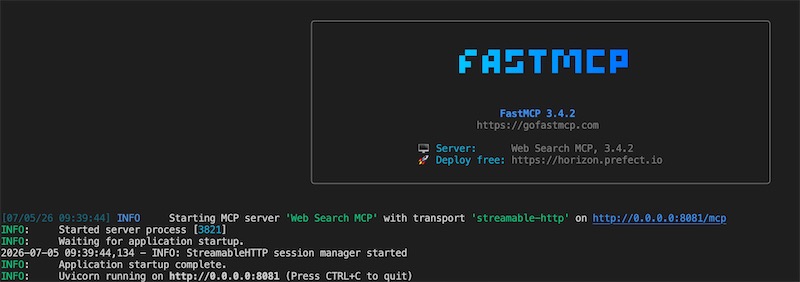
We can create a simple client to see if everything is working.
class MCPClient(Client):
    async def test_mcp_service(self):
        """
        Tester for the MCP service. Creates a client and runs the methods.
        """
        client = Client("http://localhost:8081/mcp")
        async with client:
            print(f"Connected: {client.is_connected()}")

            all_tools = await client.list_tools()
            print(all_tools)

            all_resources = await client.list_resources()
            print(all_resources)

            all_prompts = await client.list_prompts()
            print(all_prompts)

            response = await client.read_resource("help://about")
            print(response)

            response = await client.call_tool("search_web", {"limit": 1, "q": "How to make red wine"})
            print(response)

if __name__ == "__main__":
    mcp = MCPClient(transport="http")
    asyncio.run(mcp.test_mcp_service())
This should give you MCP endpoints and eventually search for what is defined in the “q” for the json object.
OpenAI Agent using MCP
Now that we have a MCP server built, we will build the OpenAI agent that can use this service to get current affairs. Let’s start on that now.
This probably would be the simplest part of the blog based on whatever we have gone through before. Since we have already gone over how to create an OpenAI SDK based application, we will just go over briefly on the MCP calling part of the SDK.
So, we create an agent and then we make sure we add the MCP server as a tool that can be accessed.
 async def run_agent(self, prompt: str):
    async with MCPServerStreamableHttp(
      name="Web Search MCP",
      params={
        "url": "http://localhost:8081/mcp",
        "timeout": 10,
      },
      max_retry_attempts=3,
    ) as server:
      await server.connect()
      helper_agent = Agent(
        name="Helper Agent",
        instructions="You are a helpful assistant for general queries. When needed, you will use the MCP server to get data from web.",
        model=self.agent_model,
        mcp_servers=[server],
        model_settings=ModelSettings(tool_choice="required")
      )
      response = await Runner.run(helper_agent, prompt)
      print(f"Agent Response: {response.final_output}")
The only change here is we are adding the MCP server as mcp_servers as a list. That’s it, now the only thing needed is to call with a prompt that is not part of the training of the model in use. Let’’s do it now.
if __name__ == "__main__":
    load_dotenv()

    OLLAMA_MODEL = "llama3.1:8b"
    OLLAMA_EP = "http://localhost:11434/v1"
    OLLAMA_KEY = os.getenv('OLLAMA_API_KEY')

    ta = MCPCaller(model=OLLAMA_MODEL, ep=OLLAMA_EP, key=OLLAMA_KEY)
    prompt = "As of 2026, which team is the basketball world champion now?"
    asyncio.run(ta.run_agent(prompt))
This goes and searches web to get the response.
Agent Response: Based on the web search results, as of 2026, the basketball world champion is the New York Knicks. They won the NBA Finals in 2026 by defeating the San Antonio Spurs 4-1.
Conclusion
That’s the last of the blog for OpenAI SDK. We will start with LangGraph next month. Hope you enjoyed this blog. Ciao for now!